Key Takeaways: It’s Not Just a Form
- The Golden Rule: You cannot just “switch” courses mid-year by filling out a form. At UNISA, changing your qualification is treated as a New Application.
- The Window: You must apply during the official application period (usually April/May for Semester 2 or August/September for the next year).
- Credits: You can transfer credits from your old degree to your new one, but only up to 50% of the new qualification.
- NSFAS Warning: Changing your course eats into your N+1 years. If you change too late, you might finish your degree without funding.
- The Myth: The DSAR08 form is for academic records, not for changing your degree. Do not waste time submitting it for this purpose.
It happens. You registered for a Bachelor of Education, but after one semester of Psychology modules, you realize you actually hate teaching and want to do Industrial Psychology.
At a residential university like UJ, you would walk to the Faculty Office and sign a “Change of Degree” form. At UNISA, it is different. Because UNISA processes millions of applications, they do not have a simple “switch” button.
To change your course, you effectively have to “quit” your old one and “apply” for a new one. This process confuses thousands of students every year, leading to missed deadlines and lost credits.
Here is the definitive step-by-step guide to changing your qualification in 2026 without wrecking your academic record.
Phase 1: The “New Application” (The Only Way)
You cannot change your qualification outside of the official application dates.
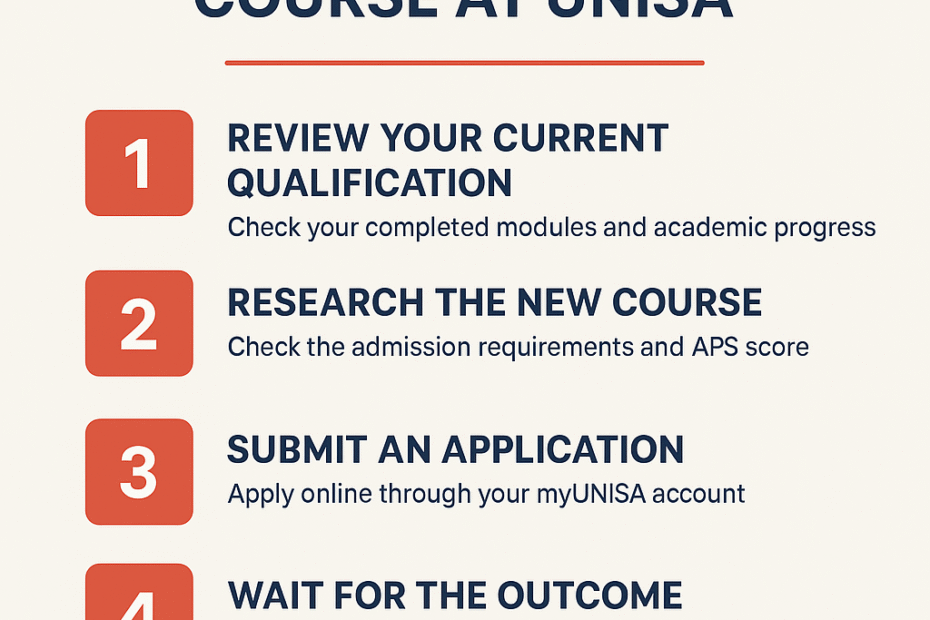
Step 1: Wait for the Window
- Semester 2 Intake: Opens approx. 15 April – 10 May 2026. (Only for Semester modules).
- 2027 Intake: Opens approx. August – October 2026. (For Year modules like Teaching/LLB).
Step 2: Apply Online
- Log in to the UNISA Application Portal (Not myUnisa).
- Select “returning student” (since you already have a student number).
- Select “Change of Qualification” or “New Qualification”.
- Choose your new stream (e.g., Bachelor of Commerce in Law).
- Cost: You usually do not pay the application fee again if you are already a registered student, but check the prompt.
Step 3: Wait for the Offer
- Just because you are already a UNISA student does not mean you are guaranteed entry into the new degree. You must meet the APS requirements for the new course.
- Example: If you are moving from Higher Certificate to Bachelor of Science, they will check your Matric Maths mark again.
Step 4: Accept the Offer
- If successful, you will receive an offer letter. You MUST accept it within 10 days.
- Once accepted, your status on myUnisa will update to the new qualification for the next registration cycle.
Phase 2: Transferring Credits (Exemptions)
This is the most critical step. You don’t want to repeat “English 1501” if you already passed it in your old degree.
The Rule:
You can only transfer credits that overlap with your new curriculum.
- Example: If you move from BEd to BA, your “English” module will count. Your “Teaching Methodology” module will likely not count (it might fall away or become an elective).
The Limit:
You can transfer a maximum of 50% of the credits required for the new degree.
- You generally cannot transfer more than 120 credits (1 year) worth of work. You must complete the majority of the new degree at UNISA under the new code.
How to Apply for Exemptions:
- Register for the new qualification first.
- Once registered, log in to myAdmin > Student Admin > Apply for Exemptions.
- Select the modules you have already passed that are also in your new curriculum.
- DSAR04 Form: In rare cases, they might ask for this form, but the online process is standard now.
- Cost: There is a small administrative fee per module exemption (deducted from your student account).
Phase 3: The NSFAS Risk (The N+1 Rule)
If you are funded by NSFAS, changing your course is dangerous.
The N+1 Rule:
NSFAS funds you for the minimum duration (N) of your course plus 1 extra year (+1).
- Scenario: You study Year 1 of a BEd. Then you switch to BCom (3 Years).
- The Math: You have used 1 year. You have 3 years left of the new degree. NSFAS sees you have studied for 1 year.
- If you fail any year in your new degree, you will hit the N+1 cap before you finish.
The “Regression” Rule:
NSFAS generally does not fund you if you move down a level after passing.
- Example: You passed Year 1 of a Degree. You decide to switch to a Higher Certificate. NSFAS might reject funding because you are “regressing” academically.
- Safe Move: Moving sideways (Degree to Degree) or up (Certificate to Degree) is usually fine, provided you haven’t used up your N+1 years.
Phase 4: Common Questions
Q: Can I change my course in the middle of the semester?
A: No. You must finish the current semester exams. The change only applies to the next registration period.
Q: Do I lose my passed modules?
A: You don’t “lose” them; they stay on your academic record forever. However, they might not count towards your new degree graduation. They effectively become “waste” credits if they don’t fit the new curriculum.
Q: What is the DSAR08 form for then?
A: The DSAR08 is to request an Academic Record (Official Transcript). It is not an application form. Do not send this to the admissions department expecting a course change.
Summary: Checklist for Semester 2 2026
If you want to switch for July 2026:
- Check the Dates: Mark 15 April 2026 on your calendar.
- Check the APS: Download the prospectus for your new degree. Do you actually qualify? (e.g., Do you have Maths for the BCom you want?).
- Finish Strong: Do not drop out of your current modules now. Pass them. You might be able to use them as “Electives” in your new degree, saving you money.
- Apply Online: Submit the “New Qualification” application in April.
Action: Go to your myUnisa > Academic Record. Download your unofficial transcript. Highlight the modules you have passed and compare them to the curriculum of the new degree. This will tell you exactly how many credits you can save.
Disclaimer: Application dates and exemption rules are subject to change. Always verify with the UNISA College of Graduate Studies or Undergraduate Admissions.